A set of instructions to solve a problem or complete some well defined task in a finite number of steps
Algorithm
We have now for some time been writing our own simple programs to perform various simple tasks. The relationship between a program and an algorithm is that a program is an algorithm that has been implemented in a particular programming language. An algorithm can be communicated as a diagram (a flowchart) or as text (pseudocode).
Algorithms should:
- produce the correct output for any set of valid inputs
- respond appropriately for invalid inputs
- terminate at some point
- perform the task in as few steps as possible
- be designed so that others can follow the algorithm to modify it if needed
The study of this topic in Level 3 qualifications involves understanding and being able to implement some simple standard algorithms.
You may not ever in real projects need to code these algorithms as more efficient ways of doing the same thing may already exist in libraries in your programming languages.
The real purpose of studying them is to be able to understand there are many ways of completing a task, but some ways might be more efficient than others. Even the efficiency itself can be measured in more ways than one: e.g. use of CPU time, or use of memory.
The small set of algorithms you will need to study, fall into two groups:
- search algorithms
- sort algorithms
Search algorithms
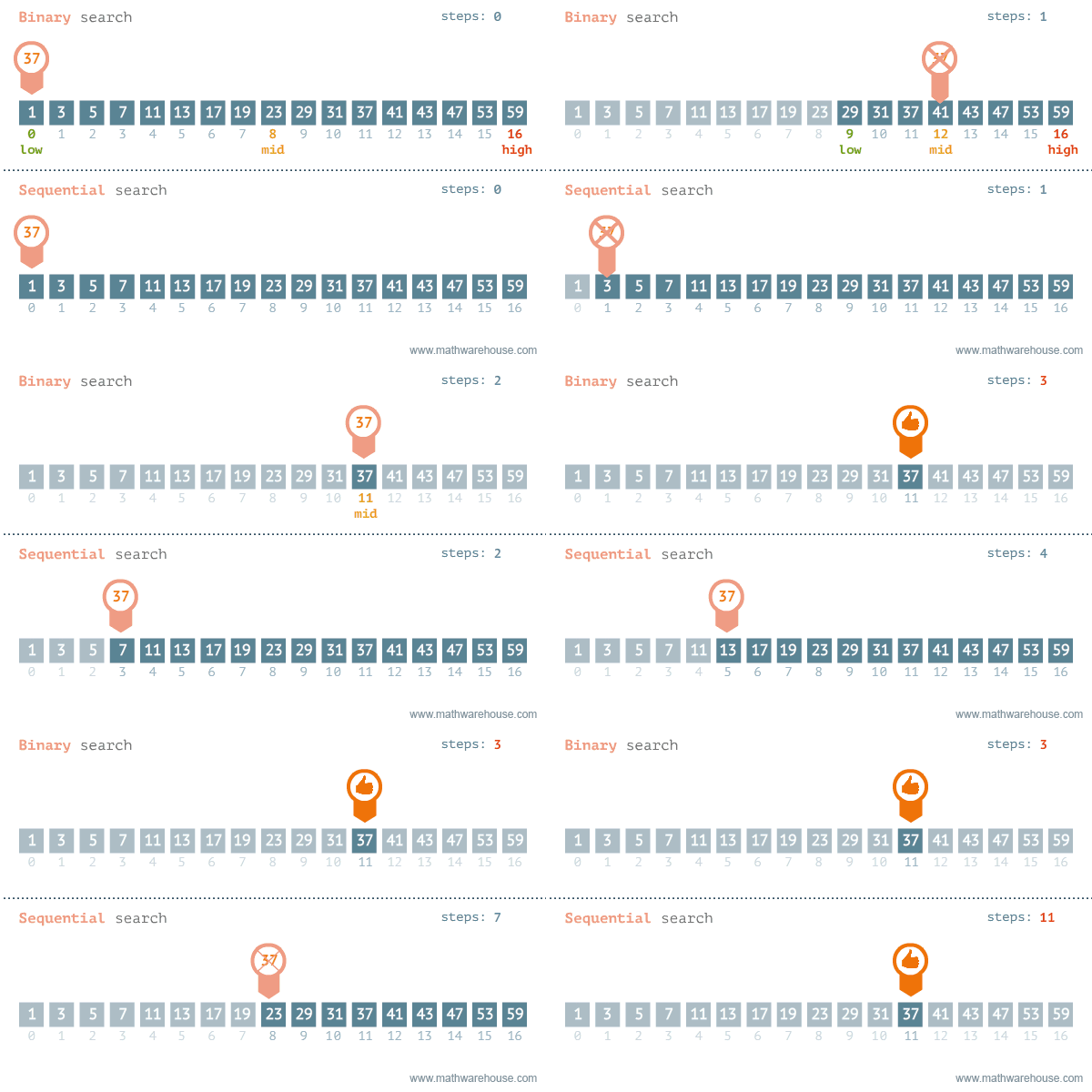
Linear search (also known as sequential search) is a simple but relatively inefficient method of finding an item in an array. The animation above shows how the linear search and binary search algorithms find a particular value being sought (in this case 37) in an array of numbers.
The algorithm in pseudocode for linear search is as follows:
index=-1
i=0
found=false

while i < length of array and found=false
    if array[i] = itemSought then
        found = true
        index=i
     end if
    i=i+1
end while
return index;
The array is searched by inspecting each element in the array one after another until the item being sought is found. When it is found, the algorithm stops and returns the position at which the item was found. If the end of the array is reached and the item has not been found -1 is returned.
Activity 1
- Using the algorithm for linear search above, and the skeleton code below, implement the linear search algorithm in BlueJ.
public class SearchApp{
    int[] testArray = {15,21,29,32,37,40,42,43,48,50,60,64,77,81,90,98};

    public int linearSearch(int itemSought){
        // implement the algorithm here
    }

}- Test your code by creating an object from your class in the BlueJ object workbench, then run the linearSearch method and supply it with the number 40. You should get a value of 5 returned.
- Try it with a value not present in the array and see if -1 is returned
Binary search
Whilst linear search works, and is relatively simple to code it is not great. The issue is that finding the item could take a long time, particularly if the item is at the end of the array.
A potentially much more efficient way of searching the array is to use a binary search. This works by dividing the search domain (i.e. the unsearched part of the array) into half, and inspecting the value in the middle. If the middle value is the item being sought we can stop, otherwise we decide which half (above or below the middle) to carry on searching in, discard the other half and start again. Because the array is cut in half each time a comparison with the search item is made, the search is much faster than linear search, especially for large arrays.
One downside of a binary search is it requires a sorted array or will not work. Linear search does not require a sorted array.
The algorithm for binary search is as follows:
found=false
index=-1
first=0
last= array length - 1

while  first <= last and  found = false
    midpoint = (first + last) integer divide by 2;
    if array[midpoint] = itemSought then
        found = true
        index = midpoint
    else
        if array[midpoint] < itemSought then
            first = midpoint + 1
        else
            last = midpoint -  1
        end if
    end if
end while

return index
Activity 2
- Using the algorithm above, extend your program from activity 1 to implement the binary search algorithm as a new method called binarySearch.
- Test with the value 98
- Test with a value not present in the array to see if you get -1
- Test with extreme values (a value smaller than the smallest value in the array, and a value larger than the largest value in the array)
Searches with non-numerical data work in exactly the same way as with numbers. A comparison with text compares the ASCII value of the characters, so for example A < a would return true as A is 65 and a is 97.
Knowledge check
- What are two measures of efficiency?
- What is a disadvantage of a linear search?
- What is a disadvantage of binary search?
- List the steps in the linear search algorithm
- List the steps in the binary search algorithm