
Type in the program from the screenshot above
- Compile it.
- Create a text file in notepad or any other text editor and add 5 or 6 lines of writing to the file.
- Save the text file as data.txt, in the same folder as your program
- Run your program
See what happens!
If it works as expected:
- Study the code to see if you can figure out what it is doing.
- Add code to display how many lines were read when the program finishes.
- Challenge: add code to display how many words were read from the file (you may need to use another Scanner object or a StringTokeniser object)
If the file contains:
Here is
My Amazing
Text File
The program should output:
Here is
My Amazing
Text File
3 lines read
(6 words read)
What is a file?
You can think of a file as a stream of either text characters, or binary values. The former is known as a text file, the latter a binary file. Text files are intended to be read and written by humans, whereas binary files are intended to be read and written by programs. Of course it is possible for a program to read or write to a text file too.
One other difference is that text files have a concept of lines (each line is separated by a carriage return/line feed character) whereas binary files do not. Binary files are simply a stream of continuous binary values from the beginning of the file to the end.
Consider the following file types, which is text and which is binary? Why?
- HTML
- Java source files
- Java byte code
- Microsoft Word documents
- JPEG files
- PDF files
One of the fundamental functions of an operating system is to provide a file system. This allows users to open, write to, delete and copy files. It also allows a programmer to write programs that make use of those same file operations as needed. All programming languages provide facilities to complete these operations in cooperation with the underlying operating system.
Java classes
The Java classes for reading files and writing to files are in the java.io libraries.
import java.io.*;To read lines of text you need to use the File class, which has a method called readLine
This reads a whole line of text into a string. If you need to then split the line into separate parts you use the StringTokenizer class or you could use Scanner.
To write lines of text to a file, you need to use the PrintWriter class. This has two main methods print and println.
Both methods print a string to a file, the difference being that println adds the end of line character after the string.
If we need to output a line in a file which is created from separate strings, we can use the + operator to join the strings, and then print the result to the file.
Activity
It is good practice to only keep files open for the shortest period of time possible. Very commonly you will see this general pattern:
Reading:
- Open the file
- Read the next line and store it in a variable
- Process the line or store it in some larger data structure
- Check if any more lines to read, if so go back to step 2
- Otherwise close the file
Writing:
- Open the file
- Fetch the data to be written to the file and store in a variable
- Write line to the file
- Check if any more lines to write, if so go back to step 2
- Otherwise close the file
In the classic 1980s movie Wargames, a student manages to connect his home computer to his school network and changes his marks for a test on the school system. You can do this by opening a file to read from, and outputting the same lines to another file that you are writing to. For one of the lines (the one that contains your name) you don’t write out an exact copy of the line, you modify that line so your score is higher! You then continue writing out the rest of the file unmodified.
Use the example text file marks.txt and a program of your own to change the score of David Lightman from his current low score of 20 to 93.
| Louise Arkwright | 83 |
| Emma Baines | 87 |
| Tim Davis | 65 |
| Bilal Khaled | 56 |
| David Lightman | 20 |
| Jennifer Mack | 21 |
| Zain Mahmood | 81 |
| Sunny Singh | 68 |
| Dorothy Wright | 44 |
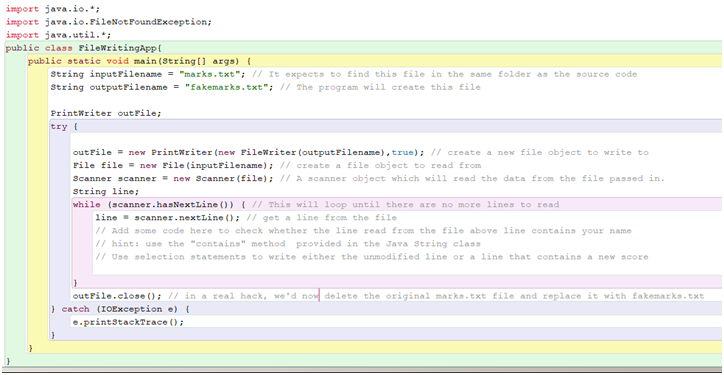
Breaking down the problem
Here are the stages you might want to complete when developing this program:
- Stage 1: read each line from the source file and output to screen
- Stage 2: instead of outputting to screen, write to fakemarks.txt
- Stage 3: add code that searches for David Lightman in the string
- Stage 4: output either the unmodified line or your modified line
Challenge: if you get the program working, see if you can modify it so the user is asked for a student to search for, and a score to give them rather than always changing David’s score to 93.
Knowledge check
- What is the difference between a text and binary file?
- What is the normal sequence when accessing a text file’s contents or writing to a text file?
- How can you modify a single line in an existing text file?